


How to evaluate your own product, identify usability problems, and recognize when a fresh perspective can make all the difference.
Nobody knows your product better than the people who built it. You know how every feature works, why certain decisions were made, and where everything lives. That familiarity is valuable when you're building and improving a product, but it can also make it surprisingly difficult to recognize when something isn't working.
Think about a sign-up flow your team has tested hundreds of times. You know which fields are required, what happens when someone makes a mistake, and where the next button takes them. But someone using it for the first time doesn't have that context. What feels obvious to your team might be confusing to them.
This is where a UX audit can help. By reviewing your product against established usability principles, you can identify friction, uncover inconsistencies, and find opportunities to improve the experience. And you don't necessarily need an outside expert to get started.
But there's an important distinction between identifying usability problems and understanding what's causing them. Some issues are relatively straightforward to fix. Others are symptoms of larger problems that require a different kind of thinking.
So what can you realistically uncover by auditing your own product, and where does that approach start to fall short?
What is a heuristic evaluation?
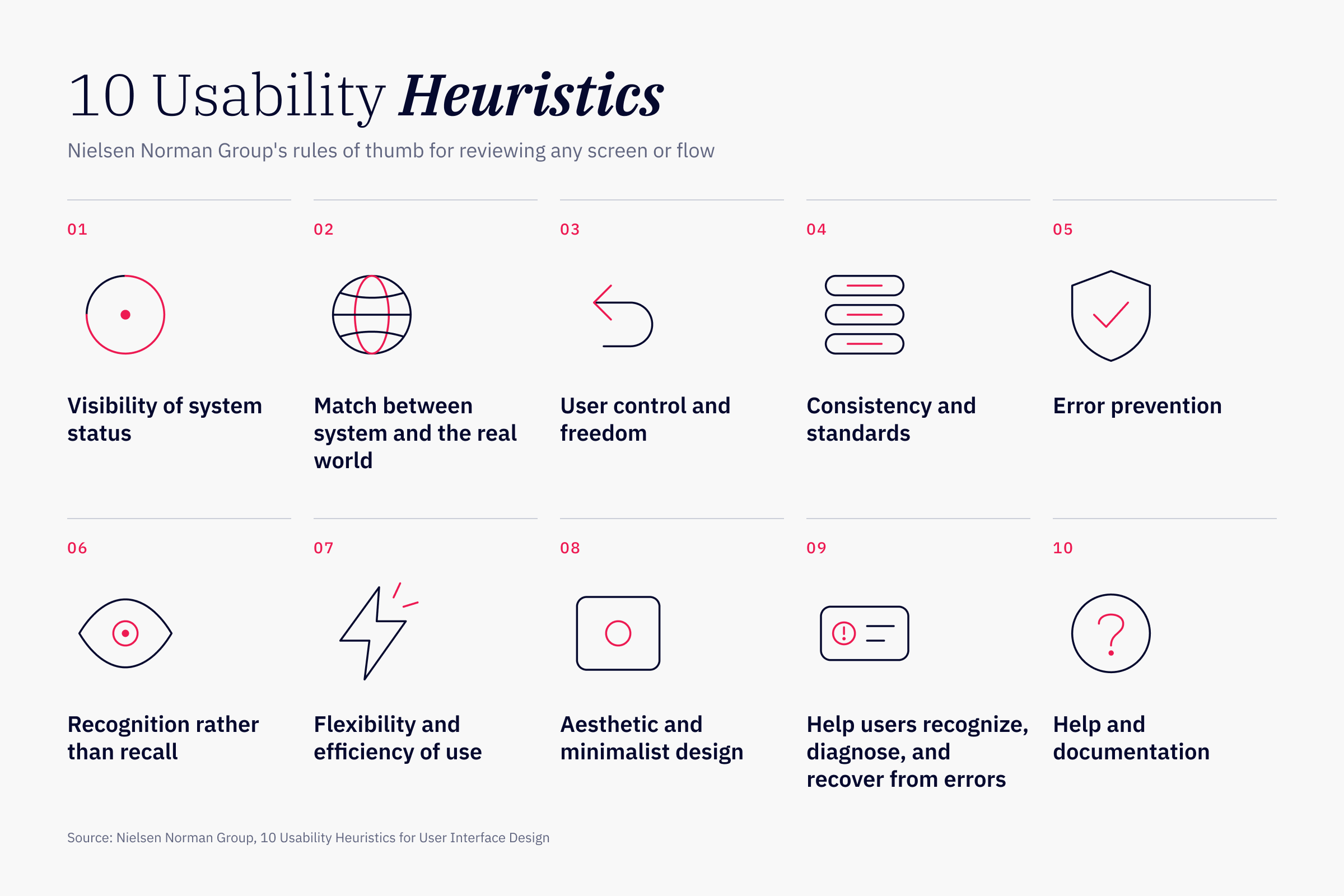
A heuristic evaluation means reviewing a screen or flow against established usability principles, or "rules of thumb." It's typically the first step in a UX evaluation since it doesn't require recruiting users. Nielsen Norman Group's 10 heuristics, published in the 1990s, are often used as the standard.
These heuristics might not sound familiar, but you've likely been applying them without their names. Inconsistent styling generally falls under "consistency and standards," and duplicated features and unnecessary content fall under "aesthetic and minimalist design." Read NN/g's full list of the 10 heuristics for the rest.
Why it's worth doing
A confusing label, a buried action, or an inconsistent navigation pattern might seem like a relatively small problem. But when those moments of friction happen during an important task, they can have real consequences. A customer might abandon a purchase, give up on registration, or contact support because they can't figure out what to do next.
A heuristic audit helps teams identify these issues before they become bigger problems. It's also a relatively accessible place to start. Unlike usability testing, which involves recruiting participants and observing how they interact with a product, a heuristic evaluation can be conducted internally with a small group of people and a clearly defined scope.
There's another benefit that's easy to overlook: it gives teams a more objective way to discuss design decisions. Instead of debating whether someone likes a particular interface, the conversation becomes about whether the experience follows established usability principles and supports what users are trying to accomplish.
And you don't have to evaluate your entire product to make meaningful progress. In fact, starting with a single high-impact flow, such as registration, checkout, or a frequently used feature, can make the findings more manageable and easier to act on.
How to run a heuristic audit yourself
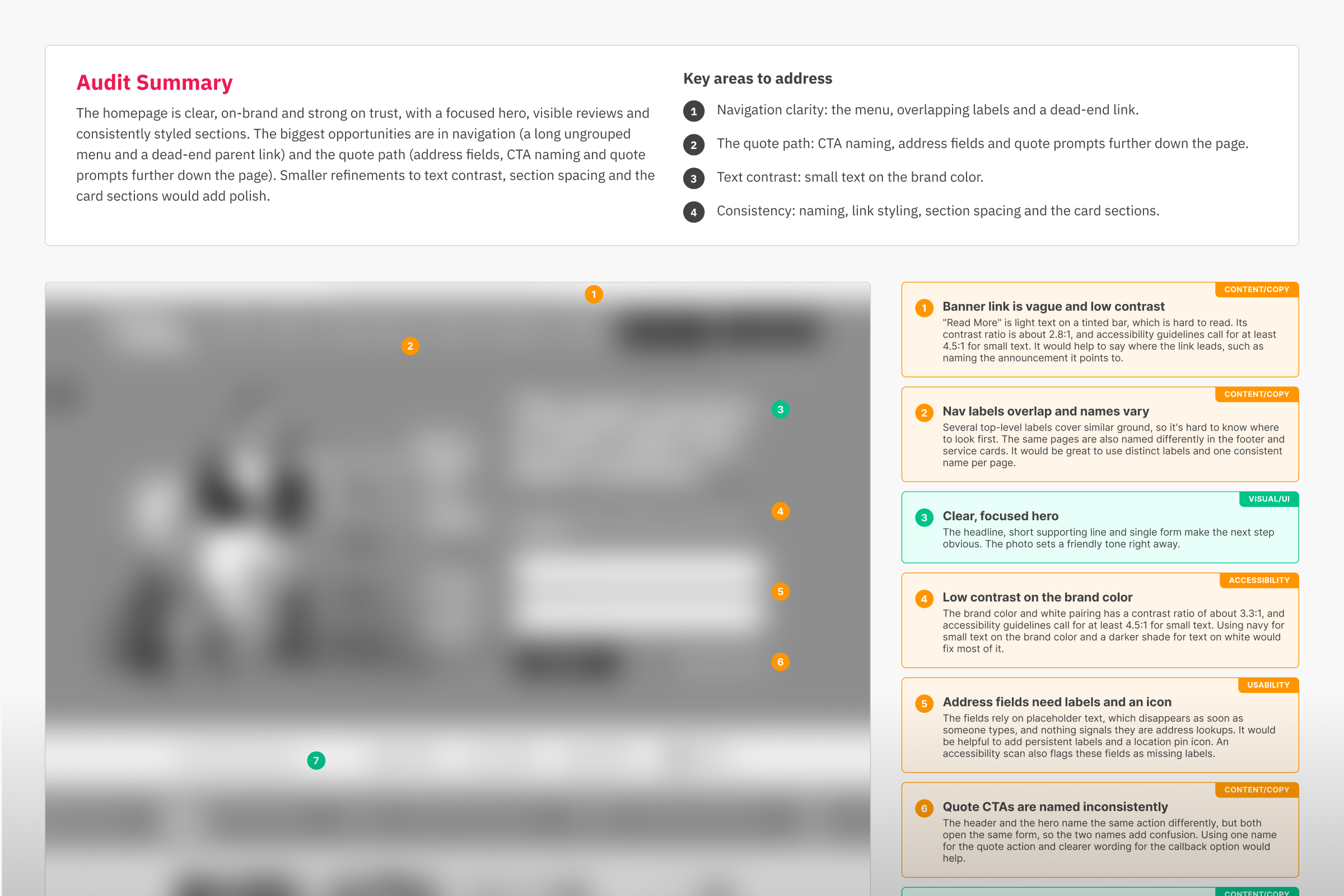
Try running a heuristic audit yourself by looking at your product through the lens of a new user. All you need is a screen or flow and a way to collect notes.
- Pick a screen or flow tied to a business goal. Sign-up, checkout or a core feature are good places to start. A narrow scope keeps the audit manageable and tying it to a goal means the findings matter to the business.
- Pretend you're using it for the first time. Forget what you know and note every spot where you hesitate, re-read something or aren't sure what to do next.
- Check each screen against the heuristics. What issues can you identify when reviewing against each rule of thumb? Note each issue you identify. You can also capture screenshots and map your notes to them, so you see exactly where each issue appears.
- Rate severity and decide what each level means. We use "Needs to be Fixed" for things that are likely to make a user fail or lose trust, and "Needs Improvement" for things that work but are unclear or inconsistent.
- Compare notes. This step is optional, but highly recommended. Have another evaluator review independently and then merge your findings.
What a finding looks like
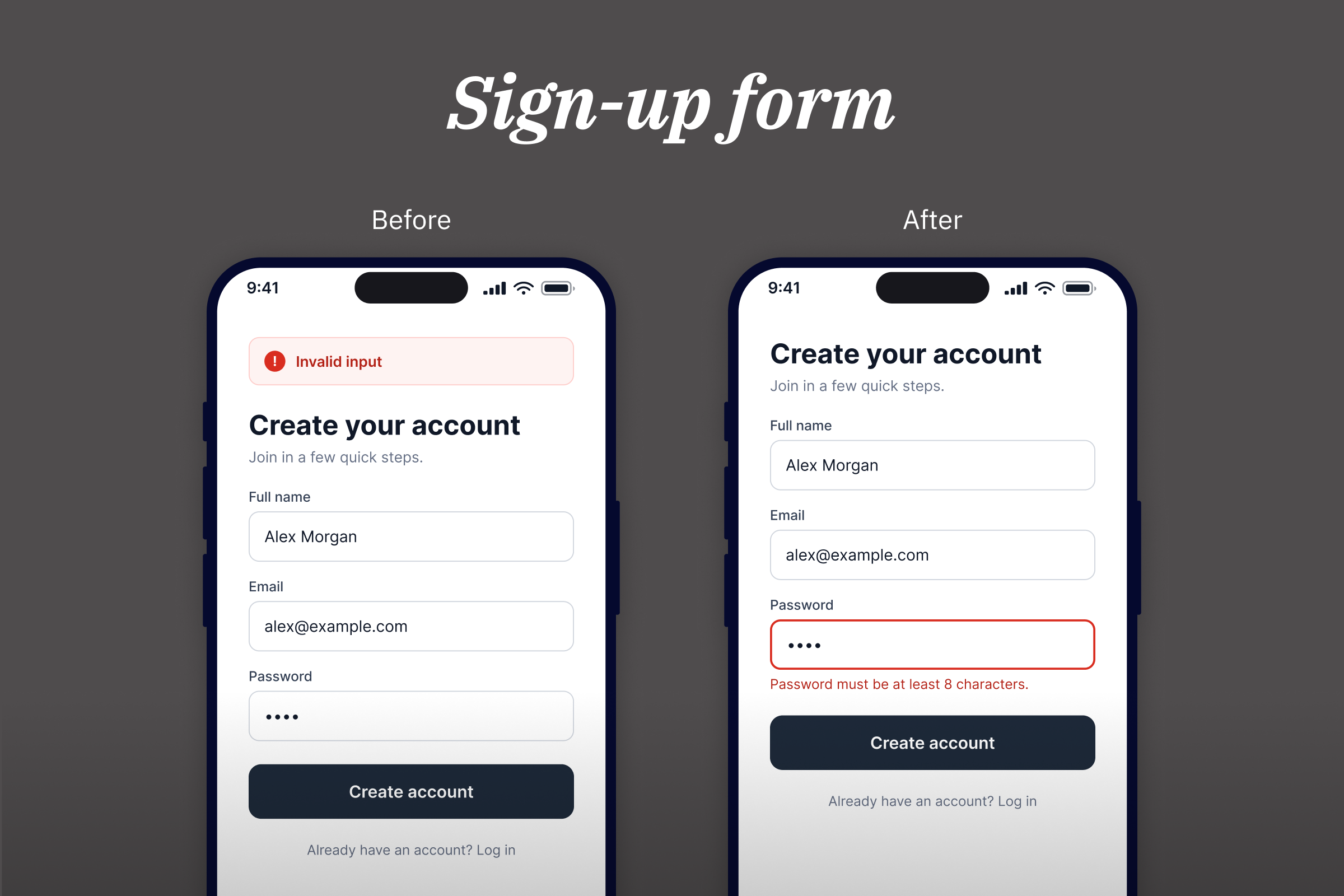
Here's an example from a sign-up form. A user enters a short password and taps "Create account." A red banner appears at the top of the screen that says "Invalid input."
- Screen: Sign-up form
- What's wrong: The message doesn't say which field has the problem or what a valid entry looks like, so the user has to guess.
- Heuristic: Help users recognize, diagnose, and recover from errors
- Severity: Needs to be Fixed. Users are likely to give up at the first step.
- Recommendation: Highlight the password field and state the rule next to it: "Password must be at least 8 characters."
Many findings look like this, and it's a small fix a team can address in an afternoon.
Where DIY audits fall short
Running your own UX audit can reveal a surprising number of issues, especially if your team is evaluating the product systematically for the first time. But even a thorough audit has limitations, and some of them have less to do with the methodology than with how we think about products we're already familiar with.
Familiarity makes some problems invisible
The more time you spend with a product, the easier it becomes to overlook the things you've learned to work around. You know what an unfamiliar icon means because you've seen it a hundred times. You know where to find a particular feature because you remember the decision to put it there.
A new user doesn't have any of that context.
People also tend to confuse personal preferences with usability problems. Someone on the team might dislike a button's color, while an icon-only navigation system everyone has grown accustomed to goes unquestioned.
One useful way to challenge these assumptions is to ask a simple question about every finding: Who is struggling with this, and why? If the answer is primarily about someone's aesthetic preference rather than a genuine usability concern, it might not belong on the list.
Finding problems isn't the same as solving them
Even when a team successfully identifies usability issues, knowing what to do with those findings is another challenge.
Some problems have relatively straightforward solutions. You can rewrite an unclear label, standardize inconsistent styling and remove redundant content. Teams often address these first because they're visible, manageable, and easy to turn into actionable tasks. But not every usability problem can be solved by fixing the individual elements on a screen.
We ran into this while reviewing an AI-generated digital card pack-opening product our team built. The audit identified several opportunities for improvement, including inconsistent styling, duplicated content, and redundant labels. The product team worked through many of those issues independently.
But there was a larger problem with the home screen. It was trying to do too many things at once. Contests, featured cards, pack odds, and the packs themselves were all competing for attention in one long scrolling experience. Each element had a purpose, but together they made it difficult to understand what the screen was actually trying to help users accomplish.
We could have kept addressing the individual findings, but that would have produced a cleaner version of essentially the same experience. The more important question wasn't how to improve each component. It was what the home screen should prioritize in the first place.
That's the distinction between addressing symptoms and solving the underlying problem. A heuristic audit can help you recognize where an experience falls short, but the findings alone won't necessarily tell you how to rethink it.
Turning findings into action
Once you've completed an audit, it's tempting to start working through the list of issues one by one. But not every finding calls for the same kind of solution. Before jumping into fixes, step back and consider what the findings are telling you.
Generally, you'll want to look for three things:
- Quick fixes: Individual issues like unclear labels, inconsistent styling, or confusing error messages that can be addressed without fundamentally changing the experience.
- Recurring patterns: Similar issues appearing across multiple screens or flows. These may point to broader problems with navigation, consistency, or information presentation.
- Structural problems: Issues that suggest the experience itself needs to be reconsidered. These often require stepping back to rethink a screen's purpose, hierarchy, or how users move through the product.
The goal isn't necessarily to fix everything at once. It's to identify which issues can be resolved individually and which deserve a closer look before you decide what to change. Sometimes the most valuable finding isn't a specific usability problem. It's recognizing that several smaller problems are connected.
What an outside perspective adds
A self-audit can take your team a long way. The next step is an outside perspective, because a fresh reviewer can spot three things that are hard to see from the inside.
Fresh eyes. Someone without your history sees the product the way a new user does. They don't know where anything lives, so they feel the friction you've stopped noticing.
Category knowledge. An experienced UX reviewer brings perspective from working across different products and industries. Understanding common design patterns, user expectations, and how similar products approach the same challenges can help reveal opportunities that might otherwise go unnoticed. This broader context helps distinguish what's familiar to an internal team from what's intuitive to the people actually using the product.
Prioritized findings. Instead of a long list, an outside audit sorts the findings. It tells you which findings are low-hanging fruit and which need big-picture thinking, and it points to the few worth tackling first. You don't need to audit everything to see how that works. A focused audit of a single screen or flow gives you a sample of what an outside perspective looks like, and what a larger audit could uncover across your product.
A fresh perspective can change what you see
The goal of a UX audit isn't simply to produce a longer list of things to fix. It's to better understand where your product is creating friction, why those problems exist, and which improvements are most likely to make a difference.
You can make meaningful progress on that work internally. Start with one important flow, evaluate it against established usability principles, and bring in a few people who aren't involved in its day-to-day development. You'll likely uncover issues worth addressing.
Just remember that not every finding deserves the same response. Some problems need a quick fix. Others might tell you it's time to reconsider a larger part of the experience.
And sometimes, the most useful thing you can bring to that process is someone who hasn't been looking at the same screens for months.
Want a second set of eyes?
At Majestyk, we help teams identify usability problems and understand what to prioritize next. If you're curious about what an outside perspective might reveal, send us a screen or flow from your product, and we'll put together a focused UX audit.
You'll receive annotated screens, findings rated by severity, observations about what's already working, and a shortlist of priorities worth exploring.
Get in touch and let's see what we can uncover.

